The last pass on AI drafts
Turn AI-sounding drafts
into natural writing.
AI text has a tell, and it isn't the em dashes.
Stock phrases and the same sentence shapes again and again. Some models also build
a statistical watermark into their word choices.
Readers notice the style even when they can't name it.
MUKU reworks the wording so the draft reads like you revised it yourself.
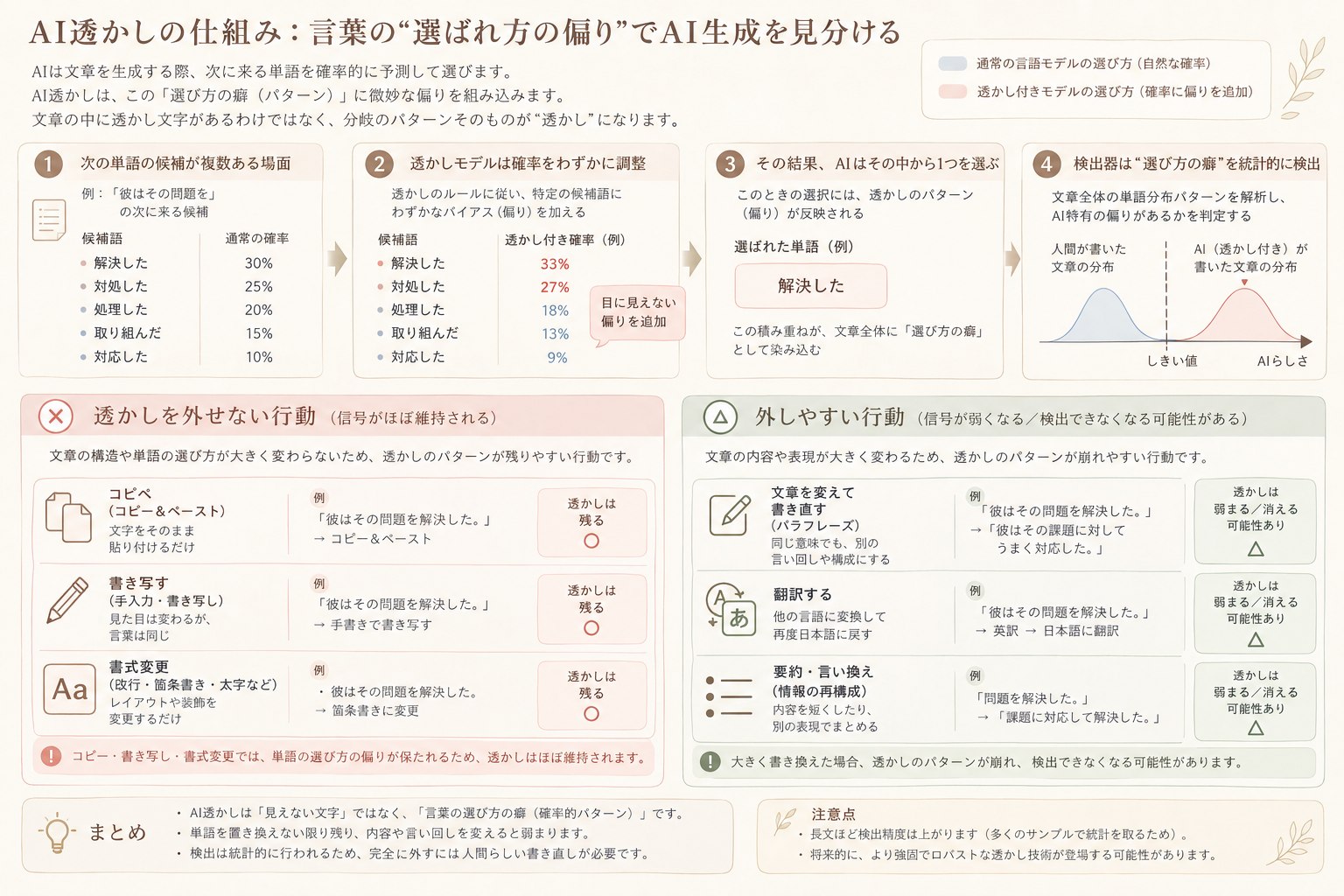
Word-choice watermarks They live in which words were chosen, so copying or reformatting leaves them in place. MUKU rephrases the wording with natural equivalents.
1,500 coins on sign-up, enough to try a text of about 6,000 characters. No card required.
MCP For AI assistant usersConnect MUKU to Claude or ChatGPT and refine your writing right inside the conversation. How to connect →A rewrite by MUKU
- 1Filler
It is important to note that → (removed)Opening filler that adds nothing
- 2Overstatement
highly → (removed)Emphasis with nothing behind it
- 3Connector
Furthermore, → (removed)Stock transition the sentence doesn't need
- 4Word choice
leverages → usesCorporate abstraction swapped for the plain word
- 5Word choice
serves to reduce → cutsPadded phrasing cut to one verb
What it fixes
Three things tend to linger in AI drafts.
Invisible characters. Zero-width spaces and unusual spaces that never show on screen. They slip in from the app you copied from and throw off word counts and layouts.
AI-sounding wording. Stock openers, vague abstractions and the same sentence ending again and again: the things readers pick up on as AI.
Statistical watermarks. Some models nudge their word choices in a pattern only a machine can check. Nothing is inserted into the text, so copying and reformatting leave the pattern intact.
How to use
Paste. Rewrite. Ship.
Three steps. Nothing to configure.
Paste the draft your AI tool produced
MUKU strips hidden characters and reworks the wording
Read the diff, copy the result, ship it
AI drafts often pick up zero-width spaces, non-breaking spaces and other characters that never show on screen but survive a copy-paste. MUKU removes them and lists exactly what it found and how many. This part is deterministic — no model involved, no guessing.
Where it fits
The last pass before anyone reads it.
Before you publish an article
Draft with AI, run it through MUKU, then hit publish
Fiction and screenplays
Blend AI-assisted scenes into the voice of the rest
Before you send it to a client
Keep your meaning, lose the stock phrasing
With MCP, you can also use MUKU from outside AI assistants (ChatGPT, Claude).
Learn moreYour text
Your draft isn't training data.
Unpublished work is worth protecting. Here is exactly what happens to what you paste.
- Never used for training Your text is sent to the model to be rewritten and nothing else. We don't train on it, and the provider that runs the model commits in its terms not to train on your text either.
- Processed in Japan The rewriting model is run by a Japanese provider on infrastructure in Japan. Your text isn't sent to AI services overseas.
- You choose whether it's stored History is a temporary copy that exists only so you can look back at your own results. It is deleted automatically after 3 days, and only you can open it. Turn it off and MUKU keeps neither your text nor the result (the provider that processes the text keeps it for up to 30 days for abuse checks, then deletes it; see the privacy policy).
- Only you can read it Stored rewrites are scoped to your account. Knowing an ID is not enough to open someone else's.
What we collect, who processes your text and how long it is kept are listed in the privacy policy.
Pricing
Buy coins. Spend what you use.
No subscription. Coins come off as you use them, nothing comes off in a month you don't. They never expire.
1,000 coins = ¥6
¥600
100,000 coins
≈ US$4 · to try it out
¥3,600
640,000 coins
≈ US$24 · 40,000 coins on top
¥6,000
1,120,000 coins
≈ US$40 · 120,000 coins on top
Prices are set in Japanese yen and your card issuer converts at their rate. The US dollar figures above are rough guides, not the amount you will be charged.
What a rewrite costs.
Coins depend on how long your text is.
Every rewrite uses a model that plans the structure of each sentence before rewriting it.
| Length | One rewrite | Rewrites per ¥600 |
|---|---|---|
| ~600 words | ~267 | ~375 |
| ~2,400 words | ~998 | ~100 |
Coins are settled against what the rewrite actually used. We hold a little extra up front
and return the difference immediately; if a rewrite fails you get all of it back.
Figures are estimates and move a little with the text.
The model plans how to restructure each sentence before rewriting, and that planning counts toward usage.
New accounts get 1,500 coins, enough to try a text of about 6,000 characters — sign up, no card required.
FAQ
Questions
Yes. With MCP, you can call MUKU from Claude or ChatGPT. How to connect is at https://muku-inkshield.com/mcp.
AI assistants won't create an account for you. Sign up yourself on the MUKU screen that opens when you add the connector: just enter the code we email you (there's no password). The steps are at https://muku-inkshield.com/mcp.
A statistical pattern some AI models build into their word choices so a machine can later check where the text came from (Google's SynthID Text is one example). You can't see it, and copying or reformatting doesn't remove it. It's a different thing from invisible characters such as zero-width spaces, and from AI-sounding phrasing. MUKU strips invisible characters and rephrases the wording with natural equivalents, so less of the pattern survives.
No. Whether a watermark is added depends on the AI provider and the service. Text without one can still carry AI-sounding wording, or invisible characters picked up along the way. MUKU handles both.
No. We don't use your text for training, and the Japanese provider that runs the rewriting model commits in its terms not to train on it either. The privacy policy lists who processes your text.
No. Paste your text and press one button.
Yes. English works well. The rewrite reads your text and answers in the same language.
Only if you want it to be. History is optional and exists only so you can look back at your own results: when it's on, rewrites are kept as a temporary copy for 3 days, then deleted automatically. Only your account can open them. The provider that processes the text keeps it for up to 30 days for abuse checks, then deletes it (it is never used for training).